Integration
Group Payment Integration
A step-by-step guide to integrating the Hands In Group Payment Method on your checkout page
Get MarkdownPre-requisites
- Setup your Hands In account - You must have created and set up a Hands In account before following this tutorial
- API Authentication - You must have retrieved your sandbox or live API key
How it works?
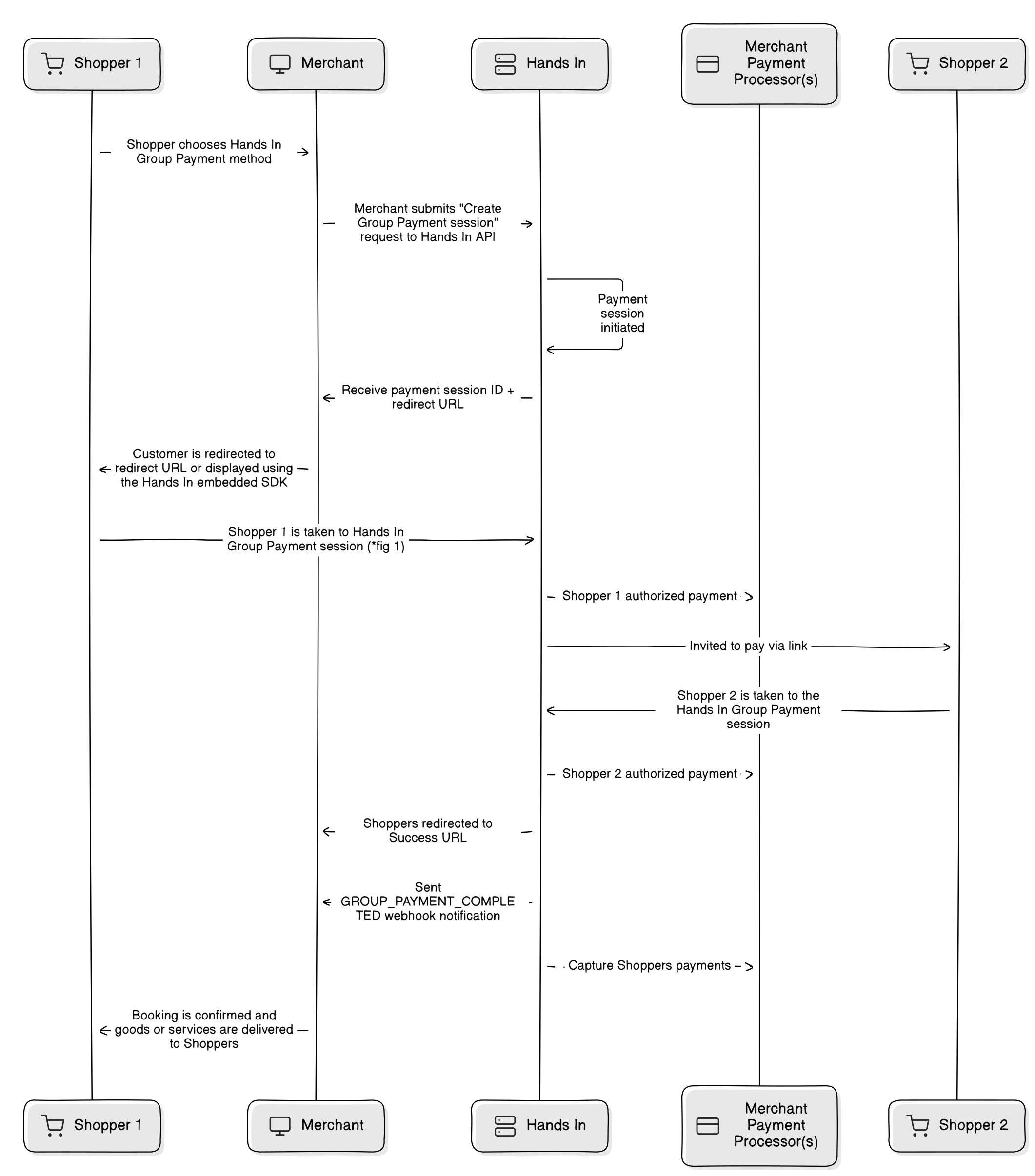
Server-to-server integration steps
- Create a group payment session —
POST /v1/group-paymentswith the total, thelineItemParams, asplitType, the group owner incustomer, a uniqueidempotencyKeyand (recommended in production) anexpirationDate. See Create a Group Payment Session for full request and response examples. - Redirect the group owner to
customerUrl— noturl. Theurlfield is the invite link that the owner shares with the rest of the group. - Optionally invite members and pre-allocate items up front — pass the
invitesanditemAllocationfields on creation so each member arrives at checkout with their share already assigned. See How to pre-allocate items. - Receive the outcome — subscribe to the group payment webhook events, or poll Retrieve a Group Payment Session.
- Reconcile each member's contribution — see Reconcile Group Payments.