Obtaining your API key
Learn how to authenticate requests to the Hands In API using your Merchant API Key
Get Markdown✅ Prerequisites
Before you begin, make sure you’ve completed the following:
1️⃣ Obtaining Your API Key
You can locate your Merchant API Keys within your merchant's dashboard under Developers > API keys.
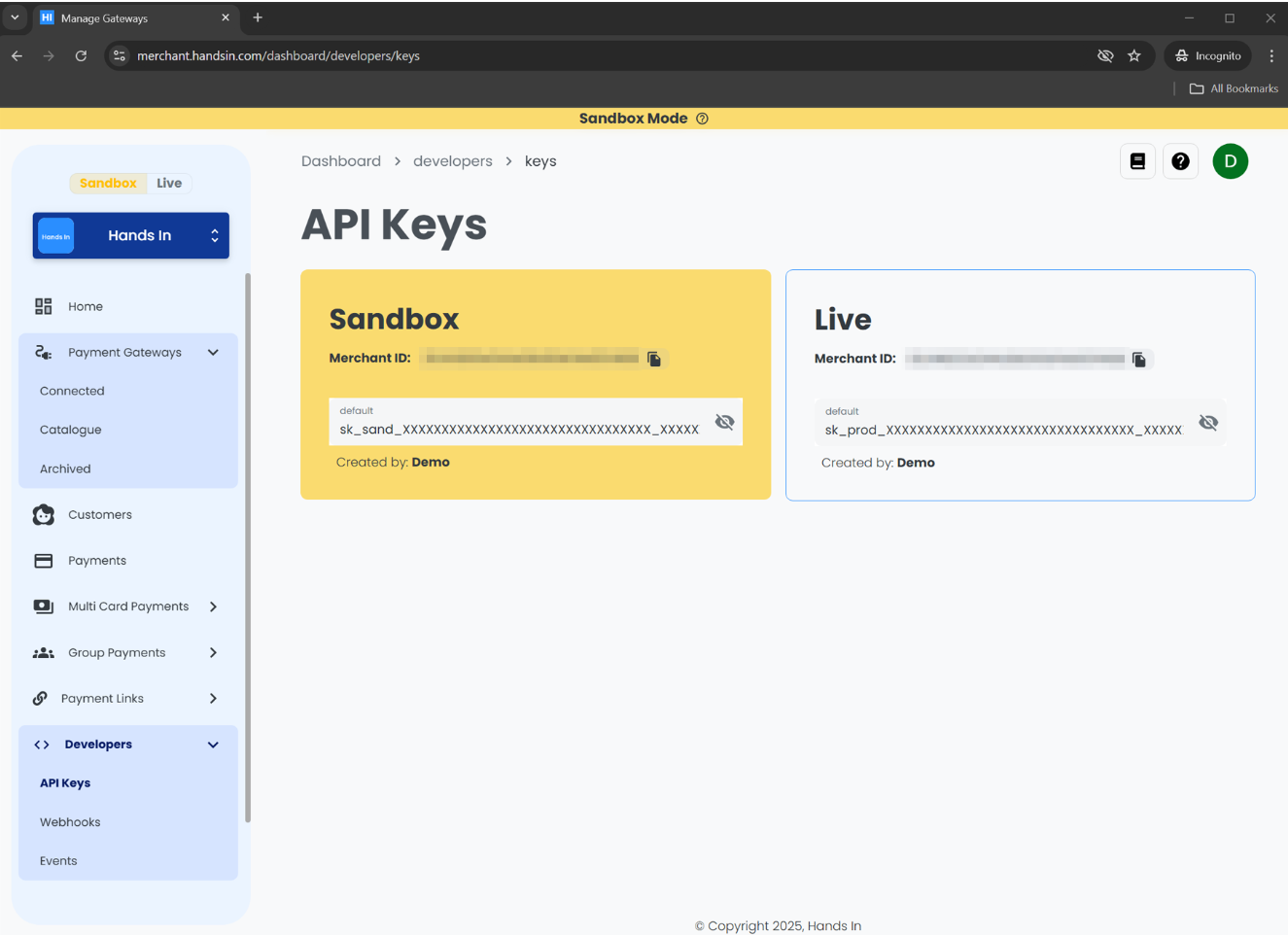
Now copy your Sandbox API key and store it somewhere safe.
Keep Your API Keys Secure
Your API key is a sensitive credential that grants access to your Merchant account.
Do not expose it in client-side code, commit it to version control, or share it publicly.
We recommend storing your keys in a secure environment variable or secrets manager.
Please contact us, if you believe you API Keys have been exposed.
2️⃣ Authenticate Requests with Your Sandbox API Key
Each request to the Hands In API must include your API key in the x-api-key request header.
The example below demonstrates how to authenticate a request using different languages and HTTP libraries.
Before continuing, ensure you’ve securely stored your Sandbox API key. Never expose API keys in client-side code or version control.
📌 Example: Authenticating API Requests
The following examples demonstrate how to authenticate a POST request to the /multi-card-payments endpoint using your Merchant API key:
curl --request POST \
  --url https://api.sandbox.handsin.com/v1/multi-card-payments \
  --header "Accept: application/json" \
  --header "Content-Type: application/json" \
  --header "x-api-key: <your-api-key>" \
  --data '{
    "amountMoney": {
      "currency": "GBP",
      "amount": 50000
    },
    "idempotencyKey": "<unique-random-string>"
  }'
const url = "https://api.sandbox.handsin.com/v1/multi-card-payments";
const payload = {
amountMoney: {
currency: "GBP",
amount: 50000
},
idempotencyKey: "<unique-random-string>"
};
try {
const response = await fetch(url, {
method: "POST",
headers: {
"Accept": "application/json",
"Content-Type": "application/json",
"x-api-key": "<your-api-key>"
},
body: JSON.stringify(payload)
});
if (!response.ok) {
throw new Error(`Response status: ${response.status}`);
}
const data = await response.json();
console.log(data);
} catch (error) {
console.error("Request failed:", error.message);
}import requests
url = "https://api.sandbox.handsin.com/v1/multi-card-payments"
headers = {
"Accept": "application/json",
"Content-Type": "application/json",
"x-api-key": "<your-api-key>"
}
payload = {
"amountMoney": {
"currency": "GBP",
"amount": 50000
},
"idempotencyKey": "<unique-random-string>"
}
try:
response = requests.post(url, headers=headers, json=payload)
response.raise_for_status()
print(response.json())
except requests.exceptions.RequestException as e:
print(f"Request failed: {e}")$headers = @{
"Accept" = "application/json"
"Content-Type" = "application/json"
"x-api-key" = "<your-api-key>"
}
$body = @{
amountMoney = @{
currency = "GBP"
amount = 50000
}
idempotencyKey = "<unique-random-string>"
} | ConvertTo-Json -Depth 3
try {
$response = Invoke-RestMethod -Uri "https://api.sandbox.handsin.com/v1/multi-card-payments"
-Method POST -Headers $headers -Body $body
$response
} catch {
Write-Host "Request failed: $($_.Exception.Message)"
}