# Obtaining your API key (/docs/guides/getting-started/obtaining-your-api-keys)
## ✅ Prerequisites [#-prerequisites]
Before you begin, make sure you’ve completed the following:
* [Set up your Hands In account](/docs/guides/getting-started/setup-your-account)
***
## 1️⃣ Obtaining Your API Key [#1️⃣-obtaining-your-api-key]
You can locate your Merchant API Keys within your merchant's dashboard under **Developers** > **API keys**.
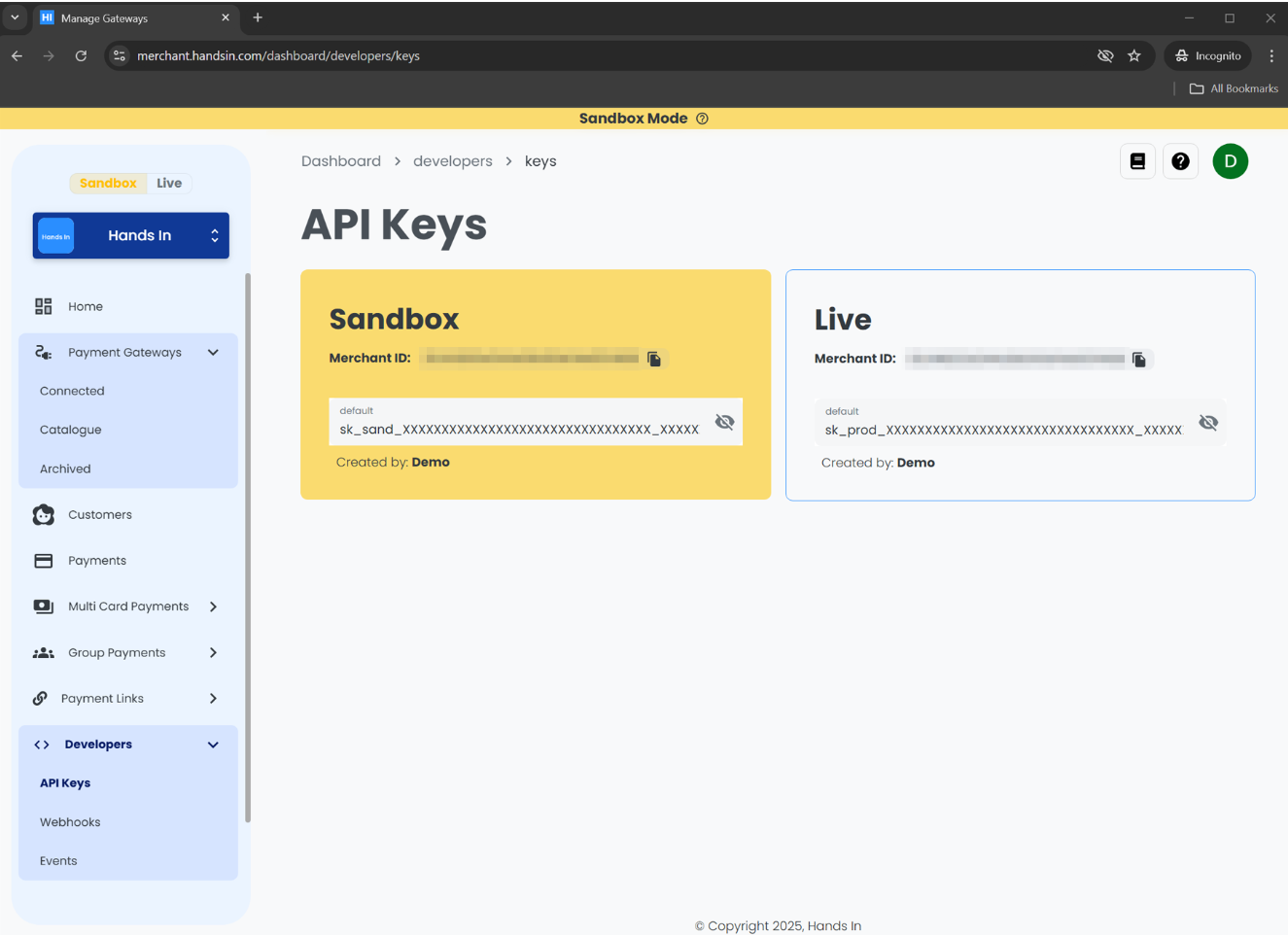 Now copy your **Sandbox** API key and store it somewhere safe.
Keep Your API Keys Secure
Your API key is a sensitive credential that grants access to your Merchant account.\
Do not expose it in client-side code, commit it to version control, or share it publicly.
We recommend storing your keys in a secure environment variable or secrets manager.\
Please [contact us](/docs/guides/support/contact-us), if you believe you API Keys have been exposed.
## 2️⃣ Authenticate Requests with Your Sandbox API Key [#2️⃣-authenticate-requests-with-your-sandbox-api-key]
Each request to the Hands In API must include your API key in the `x-api-key` request header.\
The example below demonstrates how to authenticate a request using different languages and HTTP libraries.
Before continuing, ensure you’ve securely stored your **Sandbox** API key. Never expose API keys in client-side code or version control.
### 📌 Example: Authenticating API Requests [#-example-authenticating-api-requests]
The following examples demonstrate how to authenticate a `POST` request to the `/multi-card-payments` endpoint using your Merchant API key:
```bash
curl --request POST \
--url https://api.sandbox.handsin.com/v1/multi-card-payments \
--header "Accept: application/json" \
--header "Content-Type: application/json" \
--header "x-api-key: " \
--data '{
"amountMoney": {
"currency": "GBP",
"amount": 50000
},
"idempotencyKey": ""
}'
```
```javascript
const url = "https://api.sandbox.handsin.com/v1/multi-card-payments";
const payload = {
amountMoney: {
currency: "GBP",
amount: 50000
},
idempotencyKey: ""
};
try {
const response = await fetch(url, {
method: "POST",
headers: {
"Accept": "application/json",
"Content-Type": "application/json",
"x-api-key": ""
},
body: JSON.stringify(payload)
});
if (!response.ok) {
throw new Error(`Response status: ${response.status}`);
}
const data = await response.json();
console.log(data);
} catch (error) {
console.error("Request failed:", error.message);
}
```
```python
import requests
url = "https://api.sandbox.handsin.com/v1/multi-card-payments"
headers = {
"Accept": "application/json",
"Content-Type": "application/json",
"x-api-key": ""
}
payload = {
"amountMoney": {
"currency": "GBP",
"amount": 50000
},
"idempotencyKey": ""
}
try:
response = requests.post(url, headers=headers, json=payload)
response.raise_for_status()
print(response.json())
except requests.exceptions.RequestException as e:
print(f"Request failed: {e}")
```
```powershell
$headers = @{
"Accept" = "application/json"
"Content-Type" = "application/json"
"x-api-key" = ""
}
$body = @{
amountMoney = @{
currency = "GBP"
amount = 50000
}
idempotencyKey = ""
} | ConvertTo-Json -Depth 3
try {
$response = Invoke-RestMethod -Uri "https://api.sandbox.handsin.com/v1/multi-card-payments"
-Method POST -Headers $headers -Body $body
$response
} catch {
Write-Host "Request failed: $($_.Exception.Message)"
}
```
Now copy your **Sandbox** API key and store it somewhere safe.
Keep Your API Keys Secure
Your API key is a sensitive credential that grants access to your Merchant account.\
Do not expose it in client-side code, commit it to version control, or share it publicly.
We recommend storing your keys in a secure environment variable or secrets manager.\
Please [contact us](/docs/guides/support/contact-us), if you believe you API Keys have been exposed.
## 2️⃣ Authenticate Requests with Your Sandbox API Key [#2️⃣-authenticate-requests-with-your-sandbox-api-key]
Each request to the Hands In API must include your API key in the `x-api-key` request header.\
The example below demonstrates how to authenticate a request using different languages and HTTP libraries.
Before continuing, ensure you’ve securely stored your **Sandbox** API key. Never expose API keys in client-side code or version control.
### 📌 Example: Authenticating API Requests [#-example-authenticating-api-requests]
The following examples demonstrate how to authenticate a `POST` request to the `/multi-card-payments` endpoint using your Merchant API key:
```bash
curl --request POST \
--url https://api.sandbox.handsin.com/v1/multi-card-payments \
--header "Accept: application/json" \
--header "Content-Type: application/json" \
--header "x-api-key: " \
--data '{
"amountMoney": {
"currency": "GBP",
"amount": 50000
},
"idempotencyKey": ""
}'
```
```javascript
const url = "https://api.sandbox.handsin.com/v1/multi-card-payments";
const payload = {
amountMoney: {
currency: "GBP",
amount: 50000
},
idempotencyKey: ""
};
try {
const response = await fetch(url, {
method: "POST",
headers: {
"Accept": "application/json",
"Content-Type": "application/json",
"x-api-key": ""
},
body: JSON.stringify(payload)
});
if (!response.ok) {
throw new Error(`Response status: ${response.status}`);
}
const data = await response.json();
console.log(data);
} catch (error) {
console.error("Request failed:", error.message);
}
```
```python
import requests
url = "https://api.sandbox.handsin.com/v1/multi-card-payments"
headers = {
"Accept": "application/json",
"Content-Type": "application/json",
"x-api-key": ""
}
payload = {
"amountMoney": {
"currency": "GBP",
"amount": 50000
},
"idempotencyKey": ""
}
try:
response = requests.post(url, headers=headers, json=payload)
response.raise_for_status()
print(response.json())
except requests.exceptions.RequestException as e:
print(f"Request failed: {e}")
```
```powershell
$headers = @{
"Accept" = "application/json"
"Content-Type" = "application/json"
"x-api-key" = ""
}
$body = @{
amountMoney = @{
currency = "GBP"
amount = 50000
}
idempotencyKey = ""
} | ConvertTo-Json -Depth 3
try {
$response = Invoke-RestMethod -Uri "https://api.sandbox.handsin.com/v1/multi-card-payments"
-Method POST -Headers $headers -Body $body
$response
} catch {
Write-Host "Request failed: $($_.Exception.Message)"
}
```