Reconcile Multi Card Payments
Learn how to reconcile and track payments associated with a multi card Payment Session using the Hands In API.
Get Markdown📊 Reconcile a Multi Card Session
When a customer splits a transaction across multiple cards, each payment has its own individual referenceId field.
Hands In helps you track and reconcile these payments via your systems using a custom referenceId field.
By Default, any payment made into a multi card payment session will have the following format:
{multiCardId}_{paymentIndex}Where:
multiCardIdis theidof the multi card payment sessionpaymentIndexindicates which transaction in the session the payment is associated with. For example, if a customer uses two cards, the payments will be labeled with paymentIndex values 1 and 2, corresponding to the first and second card transactions.
🧾 Using referenceId for Multi Card Payments
When creating a multi card session, you can pass a referenceId field in the request. As a result each individual card payment will have the referenceId you passed instead of the multiCardId referenced in the default format, making reconciliation possible with your systems.
Example Create Request with referenceId
curl --request POST \
  --url https://api.sandbox.handsin.com/v1/multi-card-payments \
  --header "Accept: application/json" \
  --header "Content-Type: application/json" \
  --header "x-api-key: <your-api-key>" \
  --data '{
    "idempotencyKey": "example_unique_idempotency_key",
    "referenceId": "YOUR_UNIQUE_MERCHANT_ORDER_REF",
    "amountMoney": {
      "amount": 1000,
      "currency": "GBP"
    },
    "customer": {
      "firstName": "Example",
      "lastName": "Customer",
      "email": "example@handsin.com",
      "phoneNumber": "+447232323",
      "language": "en"
    }
  }'
const url = "https://api.sandbox.handsin.com/v1/multi-card-payments";
const payload = {
idempotencyKey: "example_unique_idempotency_key",
referenceId: "YOUR_UNIQUE_MERCHANT_ORDER_REF",
amountMoney: {
amount: 1000,
currency: "GBP",
},
customer: {
firstName: "Example",
lastName: "Customer",
email: "example@handsin.com",
phoneNumber: "+447232323",
language: "en",
},
};
try {
const response = await fetch(url, {
method: "POST",
headers: {
Accept: "application/json",
"Content-Type": "application/json",
"x-api-key": "<your-api-key>",
},
body: JSON.stringify(payload),
});
if (!response.ok) {
throw new Error(`Response status: ${response.status}`);
}
const data = await response.json();
console.log(data);
} catch (error) {
console.error("Request failed:", error.message);
}import requests
url = "https://api.sandbox.handsin.com/v1/multi-card-payments"
headers = {
"Accept": "application/json",
"Content-Type": "application/json",
"x-api-key": "<your-api-key>"
}
payload = {
"idempotencyKey": "example_unique_idempotency_key",
"referenceId": "YOUR_UNIQUE_MERCHANT_ORDER_REF",
"amountMoney": {
"amount": 1000,
"currency": "GBP"
},
"customer": {
"firstName": "Example",
"lastName": "Customer",
"email": "example@handsin.com",
"phoneNumber": "+447232323",
"language": "en"
}
}
try:
response = requests.post(url, headers=headers, json=payload)
response.raise_for_status()
print(response.json())
except requests.exceptions.RequestException as e:
print(f"Request failed: {e}")$headers = @{
"Accept" = "application/json"
"Content-Type" = "application/json"
"x-api-key" = "<your-api-key>"
}
$body = @{
idempotencyKey = "example_unique_idempotency_key"
referenceId = "YOUR_UNIQUE_MERCHANT_ORDER_REF"
amountMoney = @{
amount = 1000
currency = "GBP"
}
customer = @{
firstName = "Example"
lastName = "Customer"
email = "example@handsin.com"
phoneNumber = "+447232323"
language = "en"
}
} | ConvertTo-Json -Depth 3
try {
$response = Invoke-RestMethod -Uri "https://api.sandbox.handsin.com/v1/multi-card-payments" `
-Method POST -Headers $headers -Body $body
$response
} catch {
Write-Host "Request failed: $($_.Exception.Message)"
}Now any payments made into this multi card payment session, will have the following referenceId - YOUR_UNIQUE_MERCHANT_ORDER_REF_{paymentIndex}
where YOUR_UNIQUE_MERCHANT_ORDER_REF is the value you passed in to the create multi card request above and paymentIndex we append automatically
🔍 Look Up Payments Via Your Merchant Dashboard
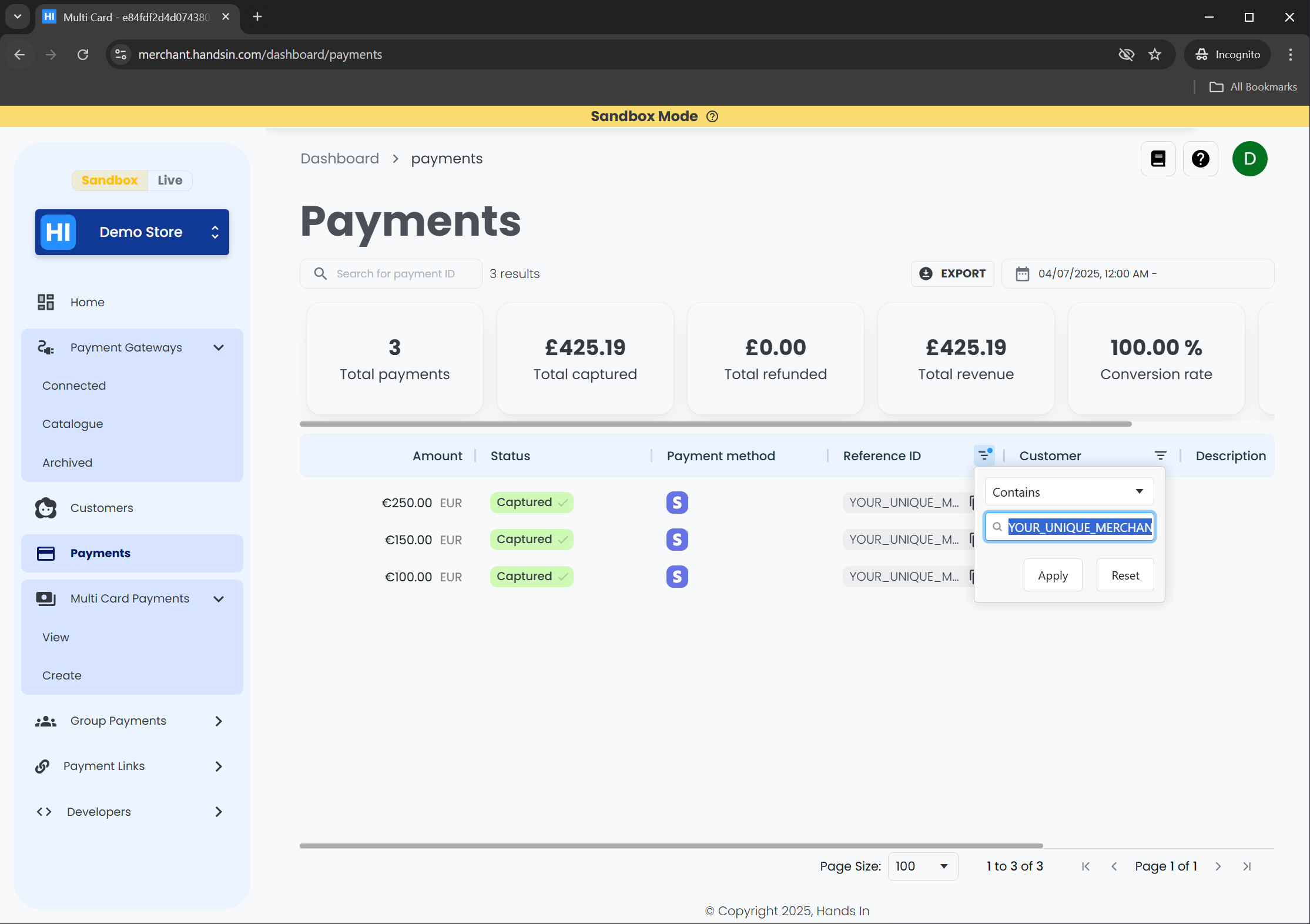
Using the table column 'reference Id' - You can search and filter your payments by your system's referenceId directly from your Hands In Payments Dashboard
In the example above, 3 payments out of many payments were found, with the following referenceIds:
| Card # | Example Reference ID |
|---|---|
| 1 | YOUR_UNIQUE_MERCHANT_ORDER_REF_1 |
| 2 | YOUR_UNIQUE_MERCHANT_ORDER_REF_2 |
| 3 | YOUR_UNIQUE_MERCHANT_ORDER_REF_3 |
✅ That's it — you've learned how to use referenceId to help reconcile payments from a multi card session using your dashboard.
➡️ For real-time reconciliation and tracking of events, we recommend setting up webhook notifications to receive updates as they happen.
Alternatively, API Integrations can poll the multi card payment session and fetch each payment for that session using the paymentIds field and in conjunction with the retrieve payment endpoint